Building Live Lecture Transcription with Speaker Filtering
A walkthrough of building a real-time audio transcription system that captures only one target speaker from a noisy room — and ignores everyone else.
A walkthrough of VAD, segmentation, speaker embeddings, and why we ended up flipping the whole pipeline.
The Goal
If you want to record your professor in a classroom and filter out everything else — friends chattering, a fan humming, a student asking a question — you need more than just transcription. You need the system to know whose voice matters and ignore the rest.
We start with a basic intuition — slice out the professor’s voice, send only that to transcription.
Step 1: Finding Where Speech Is (VAD)
We transcribe as we go, processing audio in 10-second chunks. Why 10 seconds and not 1? Whisper needs context — surrounding words — to transcribe accurately. A 1-second clip gives it almost nothing to work with, and the output is poor. 10 seconds is the minimum where the context is rich enough to get good results.
But that 10-second chunk is raw audio — silence, speech, more silence, all mixed together. The first thing we do is find where the actual speech is.
That is what Voice Activity Detection (VAD) does. It slides across the audio in small windows and gives each window a score: is someone speaking here or not? We merge the windows that score above a threshold into speech regions and drop everything else.
We pad each region by 200ms on both sides. Why? Because VAD scores frames slightly late — by the time the score crosses the threshold, the word has already started. Without padding, we clip the first and last syllables of every sentence. 200ms is enough to catch those edges without pulling in too much silence.
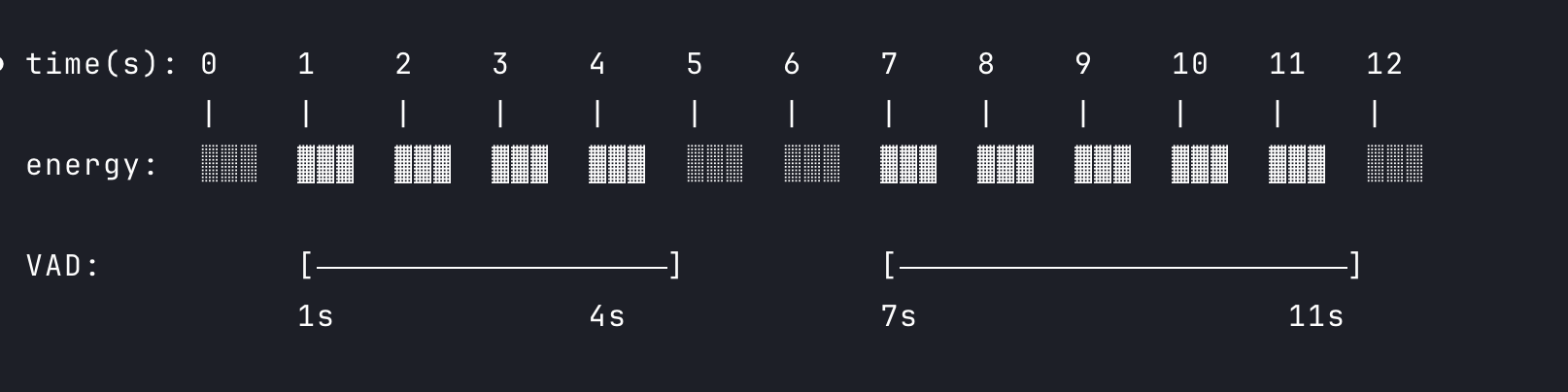
VAD finds the speech regions (highlighted). Each is padded by 200ms so we do not clip the edges of words.
After VAD, instead of 10 seconds of mixed audio, we have a few shorter regions of continuous speech. But these regions can still contain multiple speakers — the professor, a student cutting in, both mixed together. We need to separate them. We do that with a segmentation model, also ONNX. Yet another ONNX — what even is ONNX?
Why ONNX, Not PyTorch
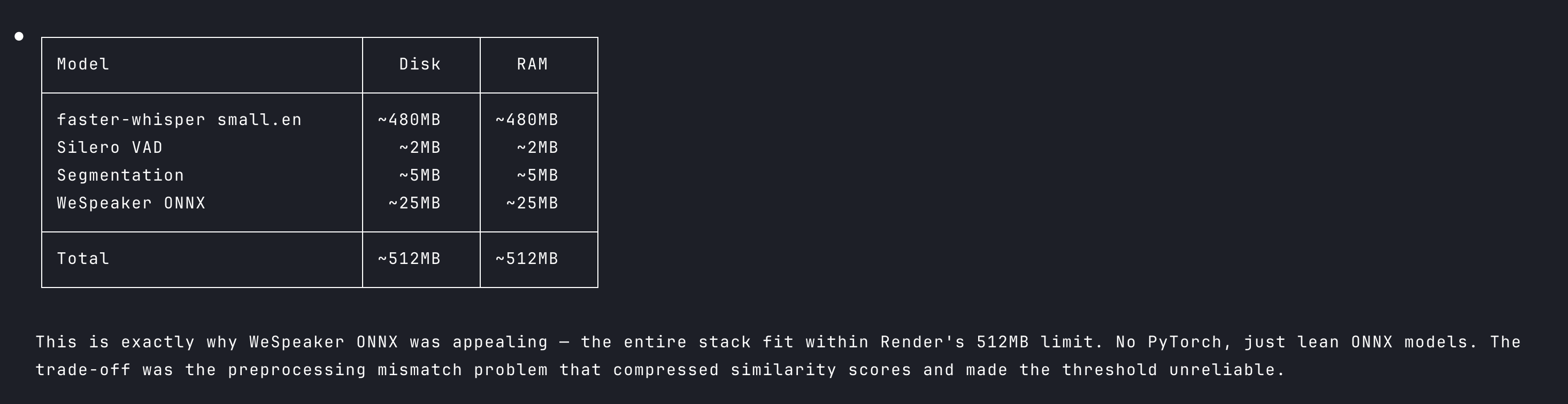
We are running this on a free-tier server — very little RAM, no GPU. Every megabyte of memory matters.
PyTorch loads everything needed for both training and inference — gradient tracking, optimizers, the full computation graph. We are not training anything. We are using a pre-trained model and just running audio through it to get predictions. That is called inference, and it is all we need.
ONNX is a format designed just for inference. It strips out everything training-related and gives you a lean runtime that does one thing: run the model. PyTorch’s equivalent would pull in a 700MB+ runtime. On a free server, that difference is between the app starting up and the app crashing on startup.
Step 2: Who is Talking? (Segmentation)
After VAD, we have speech-only segments — but a single segment can still contain multiple voices. The professor speaking, a student cutting in, the professor again. VAD does not know who is talking, only that someone is.
So we run a segmentation model on each region. It does not identify who is speaking — it only detects when the voice changes and draws a boundary there. The output is smaller sub-segments, each containing one voice at a time.
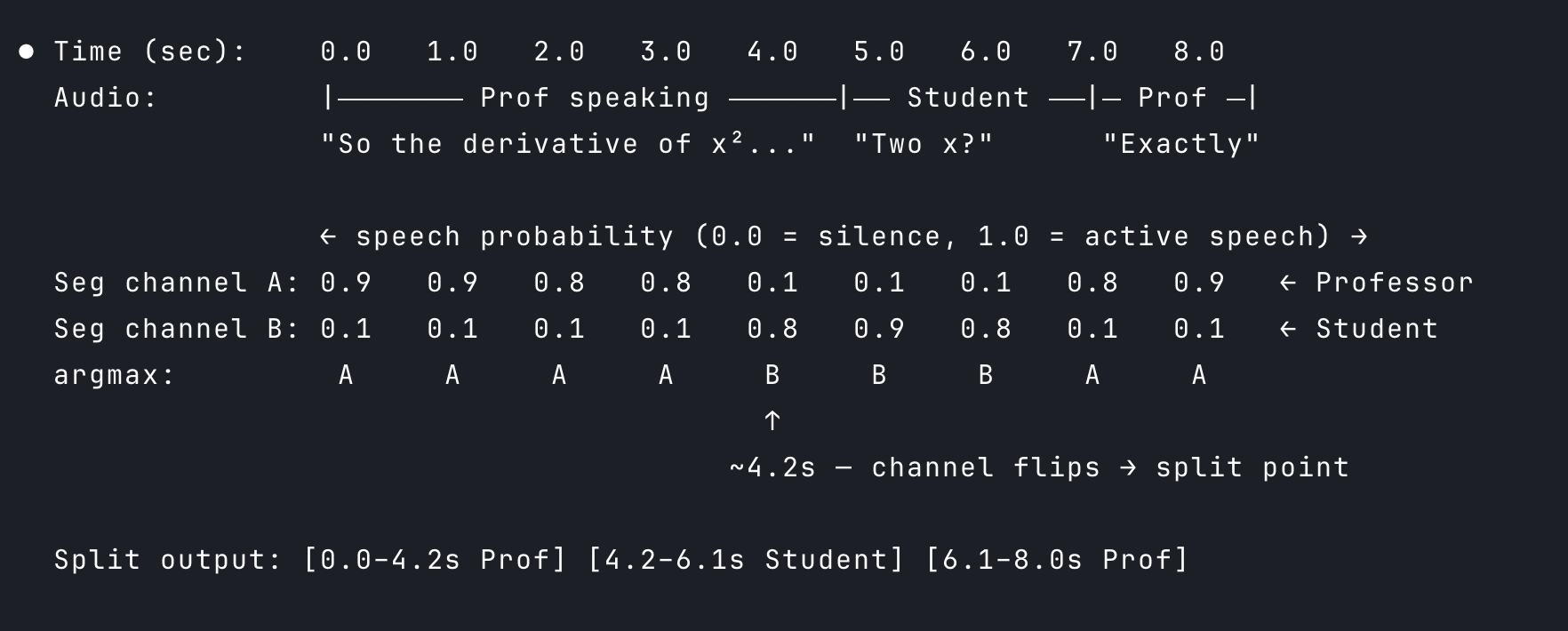
Segmentation splits a region at voice change points. It does not name the speakers — it just draws the boundaries.
Step 3: Identifying the Professor (Embeddings)
Now we have individual segments — short audio clips, each containing one voice. We need to figure out which ones are the professor. We are not interested in identifying all the speakers — we do not care who the student is or what the fan noise is. We only want the professor. That is why instead of running full speaker diarization (which labels every voice), we just compare each segment against one enrolled audio: the professor’s. If identifying all speakers is your goal, use a speaker diarization tool. Here, we only care about one.
Enrolled Audio
We initially enroll at least 10 seconds of the professor speaking alone. The longer the better — more audio means more variation in tone, pace, and energy, which gives the system a more confident fingerprint to match against later. This audio is cleaned with VAD first, so only actual speech goes in. No silence, no background noise mixed in.
That clean audio then goes into the embedding model — ECAPA-TDNN, and yes, ONNX again. We are doing a lot of jugaad here. The model takes the audio and outputs an embedding vector of 192 numbers. Easy way to think about it: each number captures one property of that voice — its tone, its rhythm, how the person shapes certain sounds. Together they form a fingerprint of the professor’s voice.
Then, for each segment from the segmentation step, we run it through the same model and get another 192-number embedding. We calculate a similarity score between that and the enrolled professor embedding. Above a threshold — professor. Below it — discard.
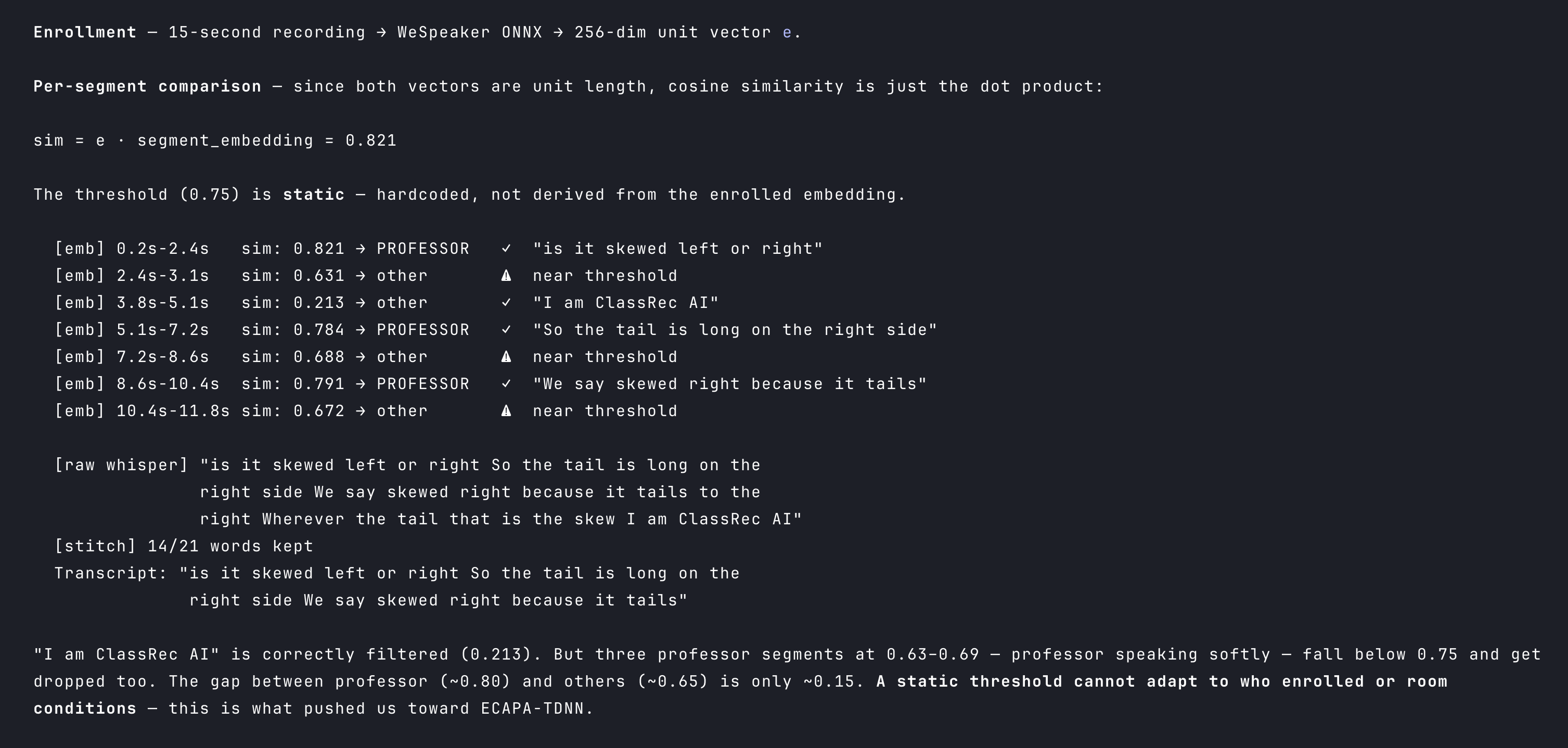
We then stitch the transcriptions of all professor segments together — and what we get is a professor-only transcript.
Memory and Disk Footprint
Limitation
We send each professor segment to Whisper, stitch the transcriptions, and get a professor-only transcript. It works — but the quality suffers.
We have been cutting the audio at every step — VAD removed the silence, segmentation split at voice changes. What reaches Whisper is not natural speech anymore. It is fragments that do not flow into each other. Think of watching a video that keeps cutting abruptly every few seconds. You can still catch most of the words, but the context is broken and things start slipping past you. Same thing here — Whisper loses context between cuts, drops words it cannot figure out, and hallucinates phrases to fill the gaps.
Read the next article → on how we fixed this.
References:
Full code here: https://github.com/codereyinish/ClassRec