Building Live Lecture Transcription with Speaker Filtering — The Revised Pipeline
A walkthrough of how we rebuilt a live lecture transcription system — same goal of capturing only the professor's voice, but with a smarter approach: transcribe everything first, filter by timestamps after.
The Pivot
In the first version, we filtered audio before transcription — cut out the professor’s segments, sent only those to Whisper. Clean logic. It did not hold up. Fragments in, bad output out.
So we flipped the order.
Send the full raw 10-second chunk to Whisper — no VAD, no segmentation, full context. Get word-level timestamps back. Then find the professor’s segments and map the timestamps to words. Filter the transcript, not the audio.
But this only works with accurate timestamps. And that is why we had to move away from the OpenAI Whisper API.
Building the Revised Pipeline
STEP 1: Enrolling the Professor’s Voice
Same as before — 10 seconds of clean professor-only audio, VAD strips the silence, embedding model outputs a 192-number voice fingerprint. The only change: we now use ECAPA-TDNN instead of the speaker ONNX model.
Why ECAPA-TDNN Instead of WeSpeaker ONNX?
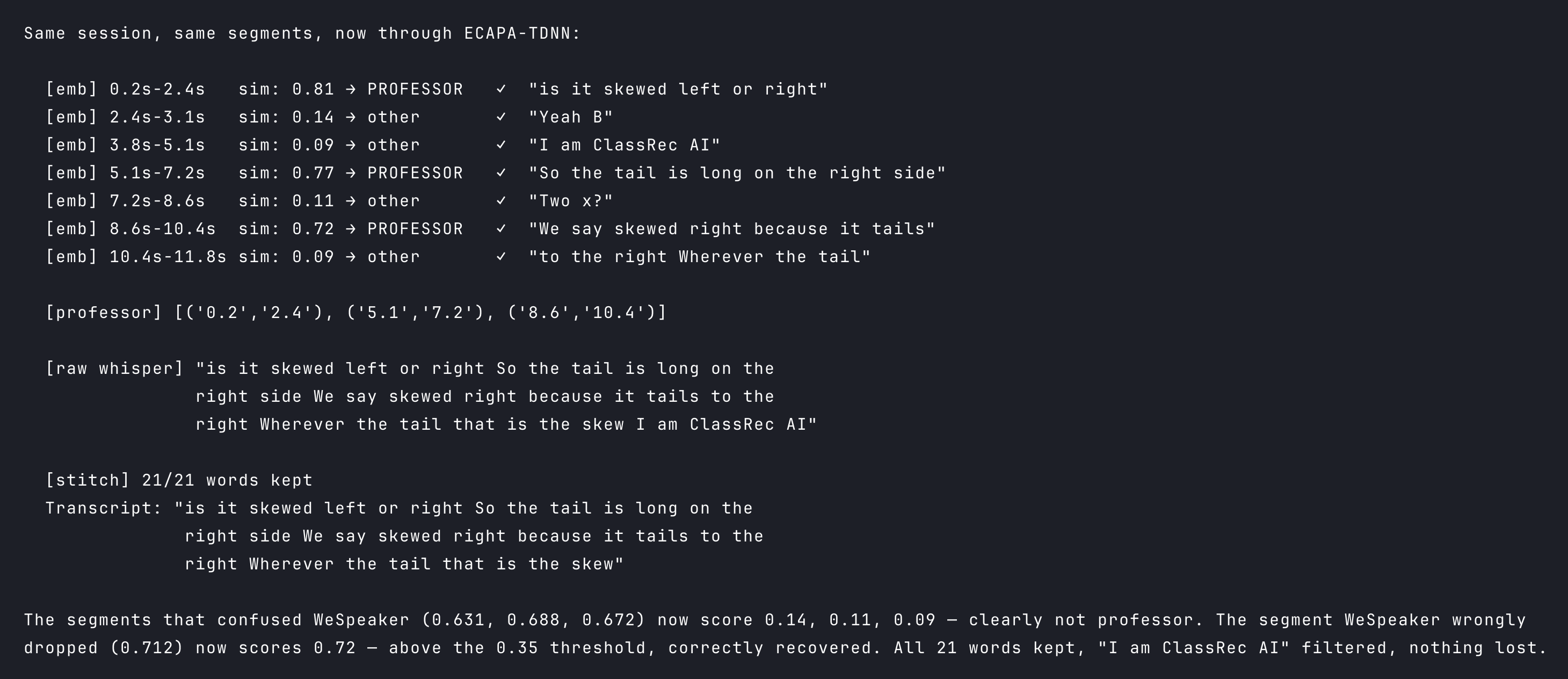
We did try WeSpeaker first. The problem was preprocessing. WeSpeaker expects a mel spectrogram — a heatmap of frequencies over time — generated with exact settings it was trained on. Get the window size or normalization slightly wrong, and the embeddings shift. The similarity gap between professor and student that should be around 0.60 collapses to 0.15. No threshold can cleanly separate them at that point.
ECAPA-TDNN via SpeechBrain takes raw waveforms directly and handles all of that internally. The scores it produces show a clear, stable gap between the enrolled professor and everyone else.
In short , ECAPA-TDNN is built for verification — is this the same person? WeSpeaker is built for identification — who is this among many? We need verification.
Step 2: Finding Where Speech Is (VAD)
Same as the previous pipeline — we run VAD through audio which gives us a list of time regions where only speech is present.
Step 3: Who is Talking? (Segmentation)
Again same as in the previous pipeline— we run segmentation through VAD regions which gives us smaller sub-segments, each containing one voice at a time, but dont know whose voice it is?
Now we have speaker segments. In the first pipeline, this is where we would slice the audio and send each professor fragment to Whisper for transcription.
We don’t do that anymore.
We don’t send the segments to Whisper at all. Instead, we have already send the full raw 10-second chunk before even doing VAD segmentation to local Whisper (not the Whisper API — more on reason of choosing this choice later) and got back a transcript with a timestamp for every word.
Why Local Whisper
Four reasons we stopped using the OpenAI Whisper API.
Cost. The API charges per second of audio. Live transcription sends a chunk every 10 seconds, continuously, per user. It adds up fast.
Latency. Every chunk makes a round-trip to OpenAI’s servers — 1–2 seconds of added delay per chunk. plus whisper takes at least 3-5 sec for 10sec chunk transcription. For live audio, that is noticeable.
Rate limits. With multiple students recording simultaneously, we can hit the API’s per-minute cap quickly and requests start failing.
Security. Classroom audio is personal. None of it should leave our infrastructure unless you choose it to. (I know — I am probably not at the scale where OpenAI is mining my classroom recordings. But the principle stands. 😅)
But the real forcing function was timestamps. The Whisper API returns word timestamps that are routinely 400–500ms off. stable-ts brings that down to ~100ms. That might sound like a small difference — it is not. Our entire word stitch depends on asking: does this word’s timestamp fall inside a professor segment? At 500ms error, words silently land in the wrong speaker’s window. At 100ms, the boundaries hold.
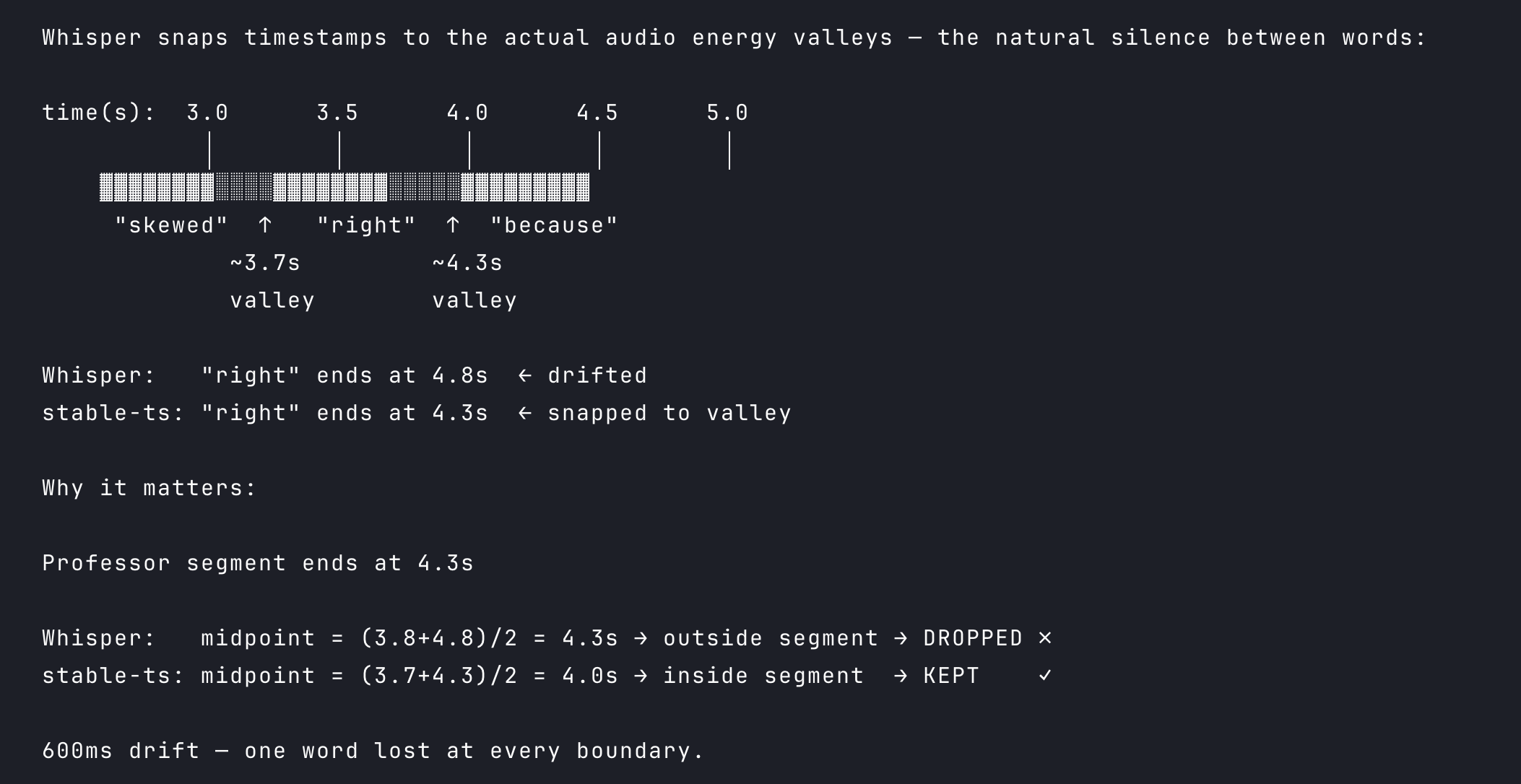
The catch: stable-ts model has to wrap the model directly. We cannot use it with an API — not the OpenAI Whisper API, not Groq. This is the reason local Whisper was not optional.
Word Stitch
At this point we have two things: a full transcript from local Whisper with an accurate timestamp for every word, and a set of professor segments — time boundaries marking when the professor was speaking.
We iterate over every word Whisper returned and check whether its midpoint falls inside a professor segment. If yes — keep it. If no — drop it. That is the stitch.
.
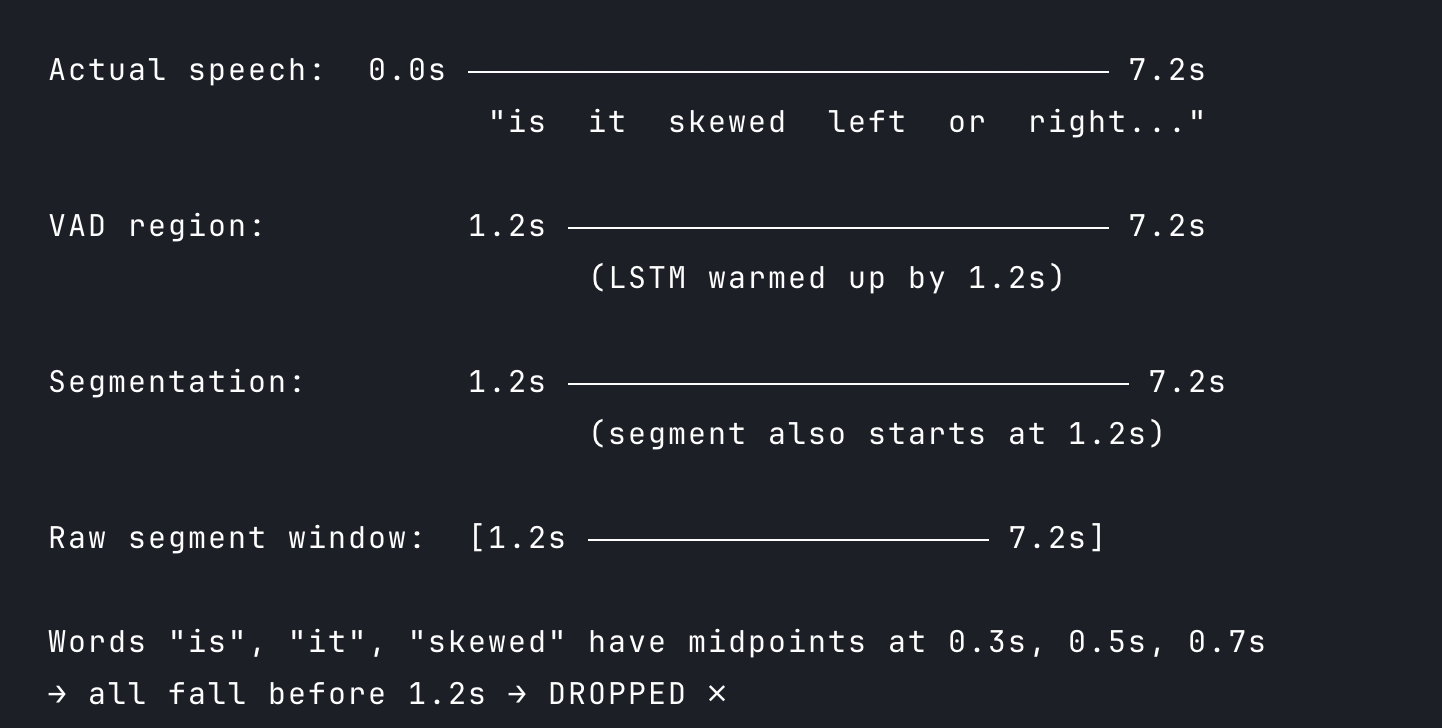
But raw segment boundaries cause a problem — sometimes the first few words get dropped even when the professor is clearly speaking. Here is why.
VAD sometimes starts late due to a cold-start dip. The LSTM scores the first 0.3–0.5s of a chunk low, so the detected region only starts at 0.5s or even 1.2s into the chunk. Any professor words spoken before that point have no segment to fall into — they get dropped by the stitch.
What is Vad Cold Start Problem?
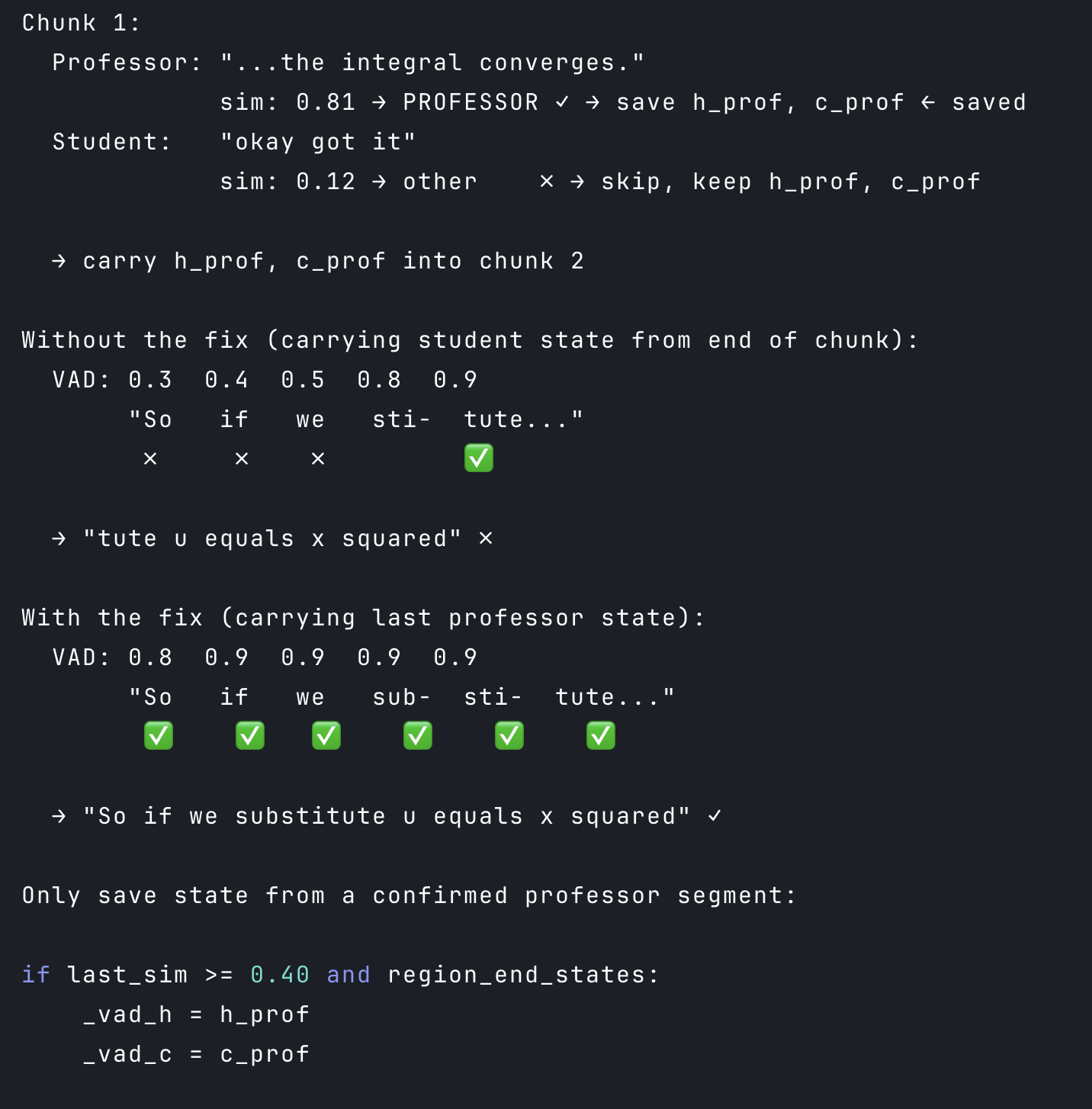
Silero VAD uses an LSTM — a model with internal memory. When a new chunk starts, that memory is zero. It takes a few hundred milliseconds of audio before the scores stabilize. During that window, real speech gets scored low and the region boundary starts late.
We carry the LSTM state forward from the previous chunk so each new chunk starts warm. And for the first professor segment in a chunk, we stretch its start boundary back to the first VAD region start — catching any words that fell in the cold window.
Final Touches
Same as the previous pipeline — the stitched transcript goes through a hallucination filter to strip known Whisper artifacts (“thanks for watching”, “please subscribe”), then a deduplication pass to remove words that repeated across the chunk boundary due to buffer overlap.
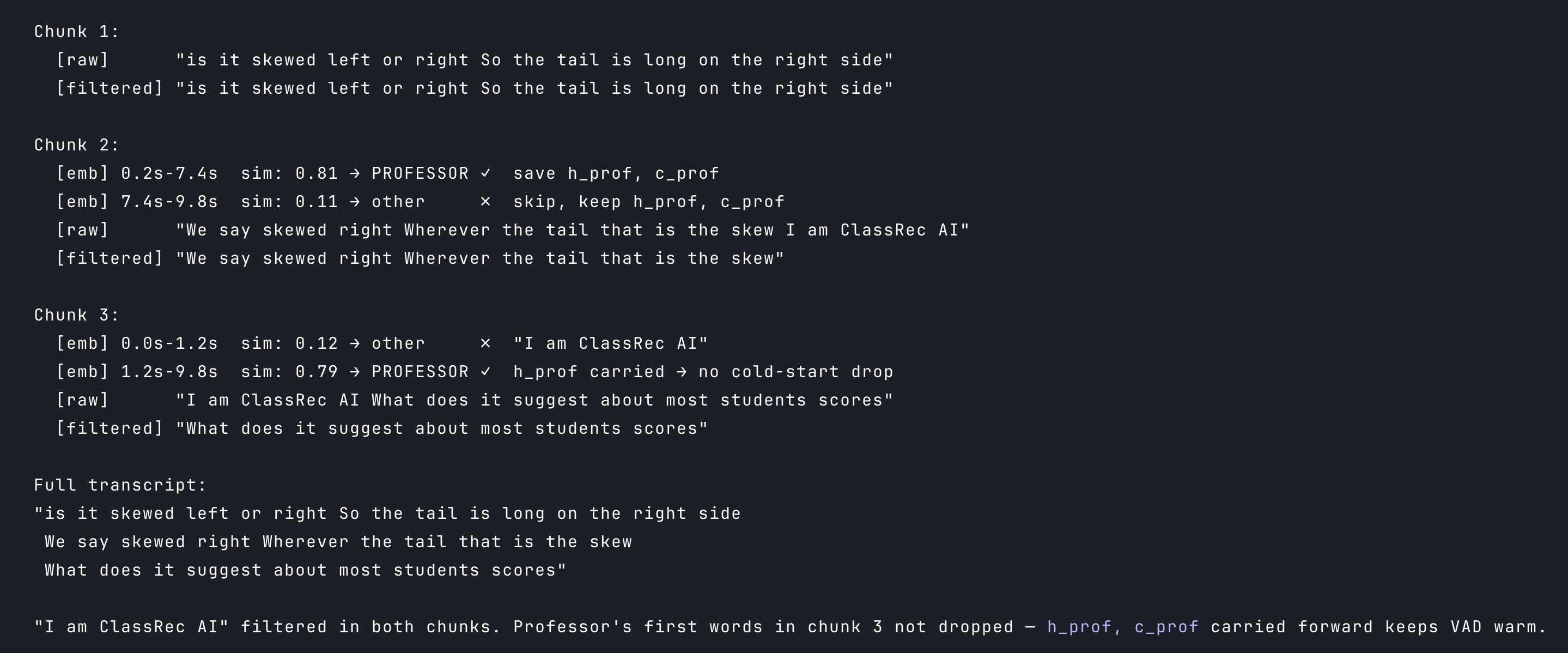
What remains gets sent to the browser.
Memory, Disk and Cost
Why We Left Render
The first pipeline ran on Render’s free tier — 512MB RAM. ONNX models fit. ECAPA-TDNN (PyTorch) and faster-whisper together do not. The app crashes on startup. So we moved to DigitalOcean for the server, and Modal for Whisper.
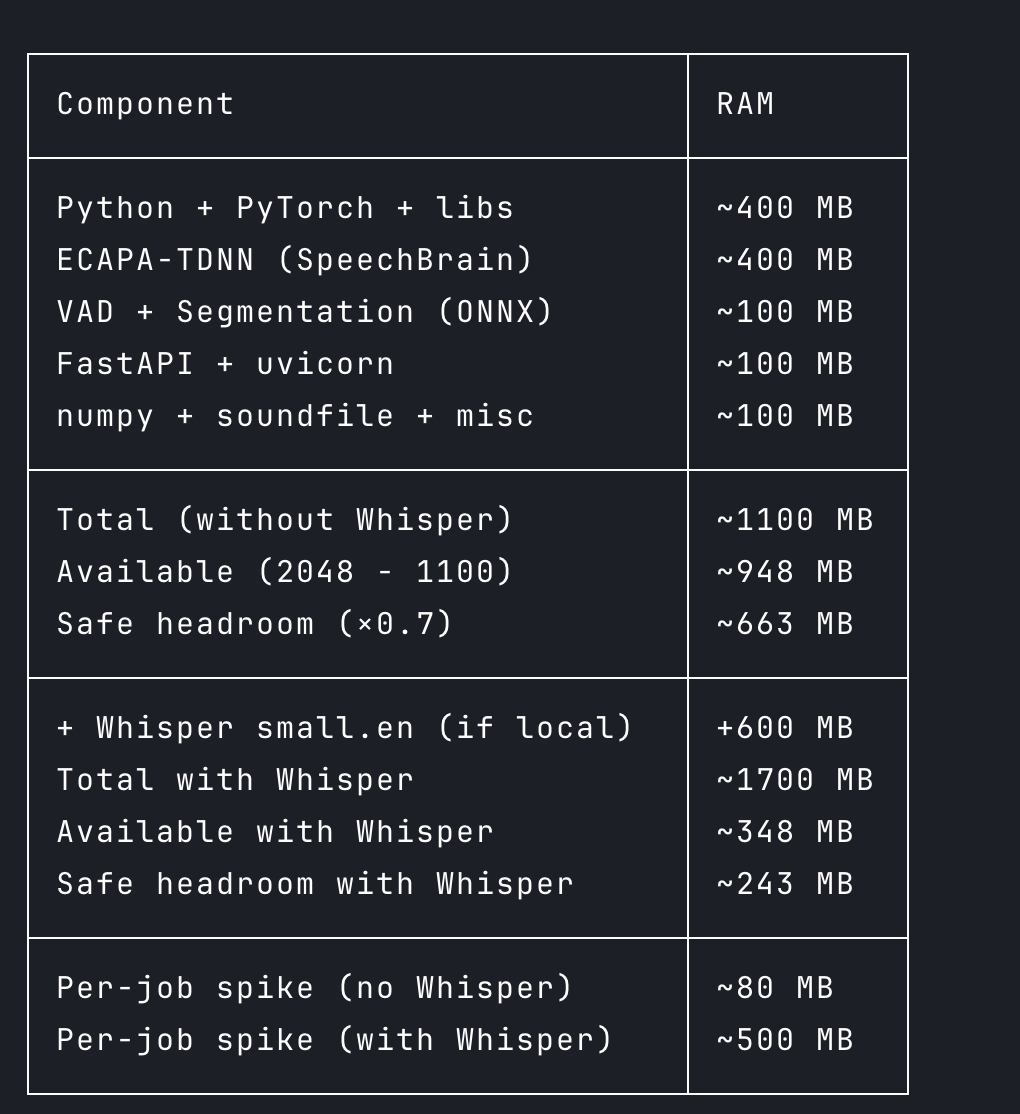
With Whisper running locally, safe headroom drops to ~243MB and the per-job spike hits ~500MB — Semaphore(1) is the only safe option, and it is tight.
At this point we had two choices: upgrade the RAM, or move the heavy work off the server entirely.
**The first option . **a 4GB droplet costs $38/month, more than double. It buys headroom but not speed. Even with 4GB RAM, faster-whisper on 2 vCPUs takes 8–15 seconds per chunk on a clean pass. And Whisper does not always make just one pass. When transcription confidence is low — noisy classroom, two people talking at once — it retries with progressively higher temperature values. Each retry is a full inference pass from scratch. On a T4 GPU that costs milliseconds. On 2 vCPUs, a single chunk with two retries can take 25–40 seconds. We send a new chunk every 10 seconds. The queue grows faster than it drains.
And that is with one user. As more students record simultaneously, every concurrent request competes for the same 2 vCPUs. The delays stack. Scaling makes an already slow system slower — and no amount of RAM changes that.
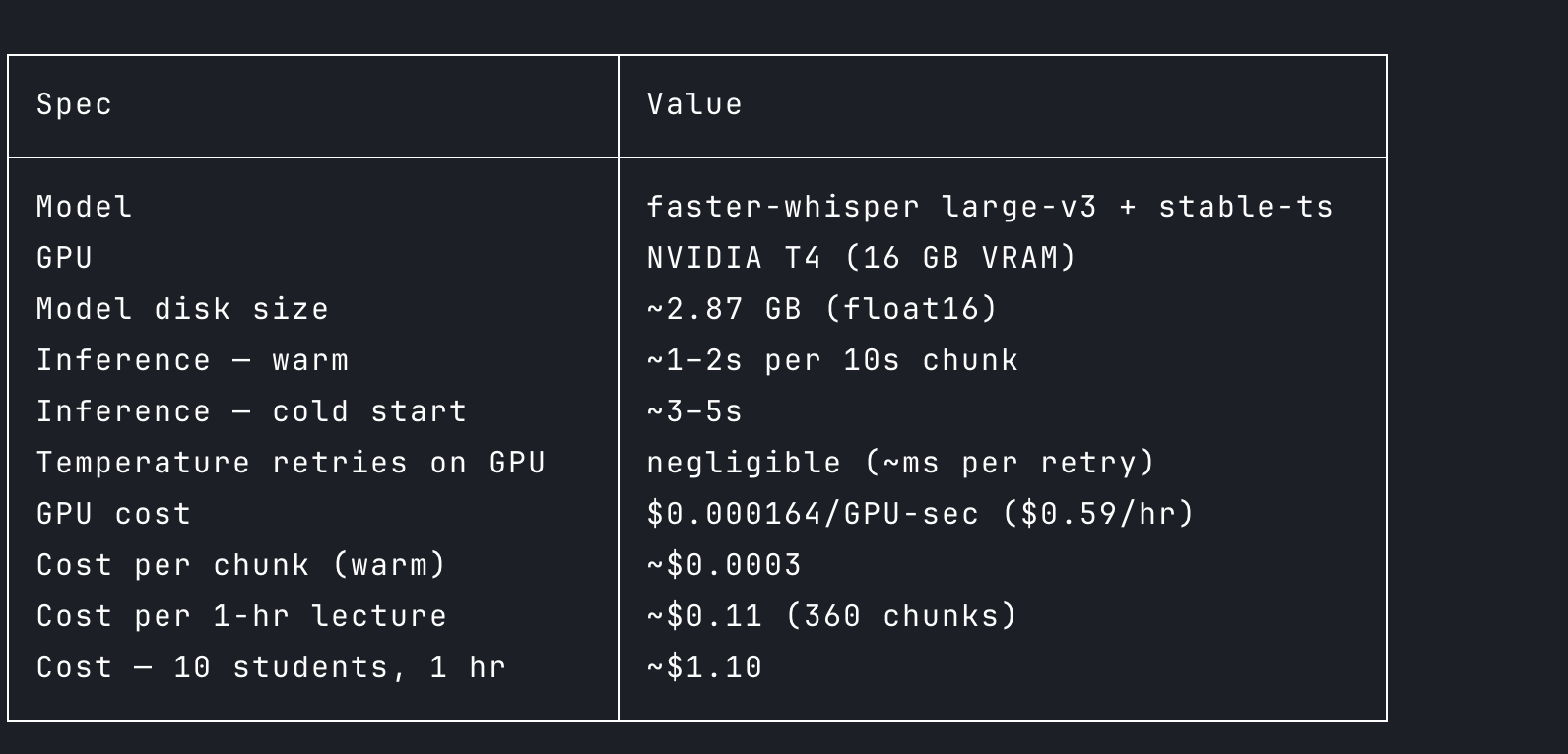
So we took the second option. CPU is the ceiling, not RAM, and the right fix is a GPU. But running a GPU server 24/7 for inference bursts is expensive and wasteful. This is exactly what serverless GPU platforms are built for. We host faster-whisper on Modal — a T4 spins up when a chunk arrives, handles inference in 1–2 seconds, and shuts down. We pay only for what we use. The DigitalOcean server handles everything else — VAD, segmentation, ECAPA-TDNN, WebSocket connections — all light enough to run comfortably on 2 vCPUs.
Model Footprint (runs on DigitalOcean)
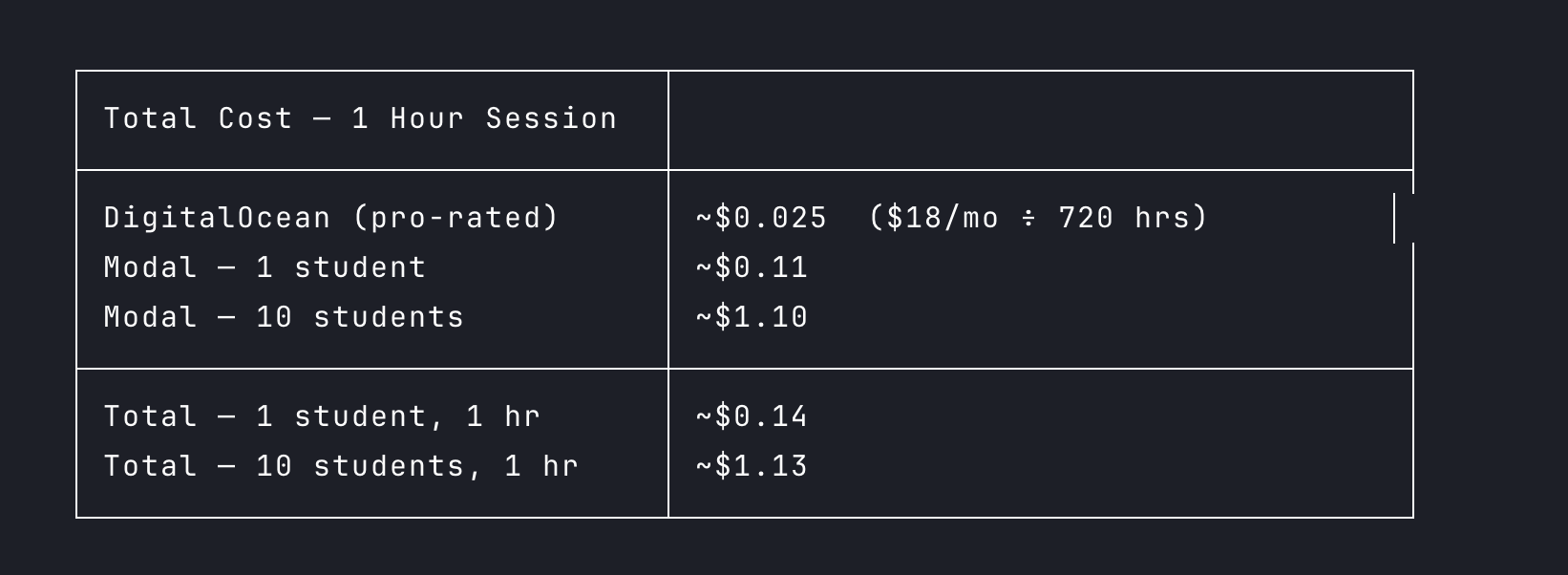
Total Cost
How to deploy faster-whisper on Modal — coming soon.
Limitations
- Speaker overlap. When the professor and a student speak at the same time, VAD merges them into one region and segmentation cannot draw a clean boundary. Both voices end up in the same segment — the professor’s words get kept but so do the student’s. The planned fix: source separation — splitting overlapping voices into separate audio streams before the pipeline runs.
References:
Full code here: https://github.com/codereyinish/ClassRec